






CANopen Router/B
A-CANOR/B
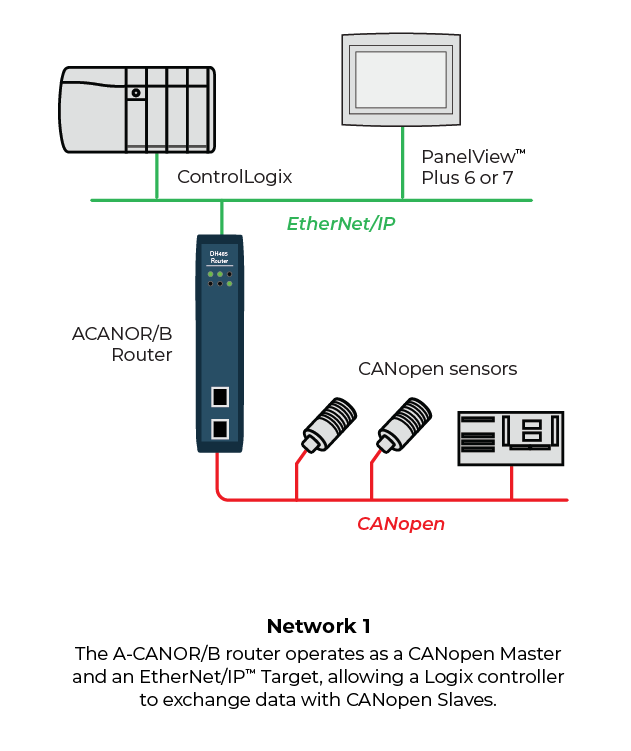
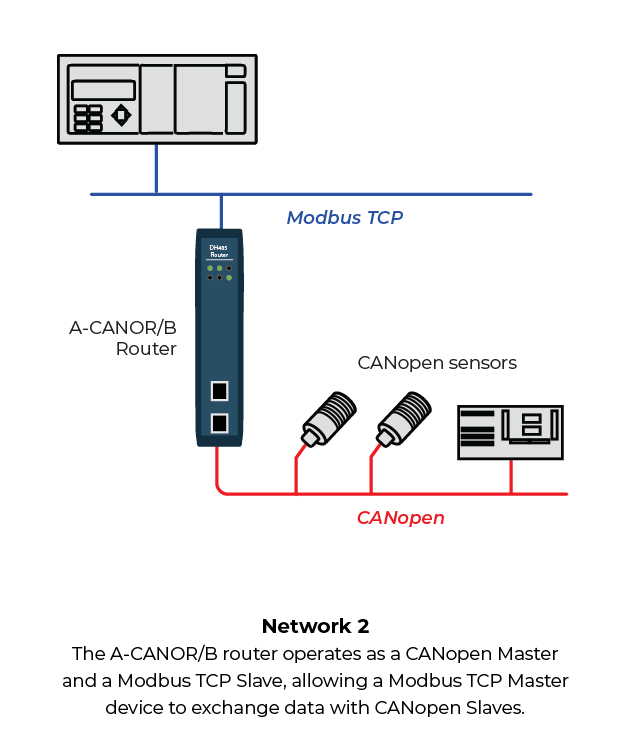
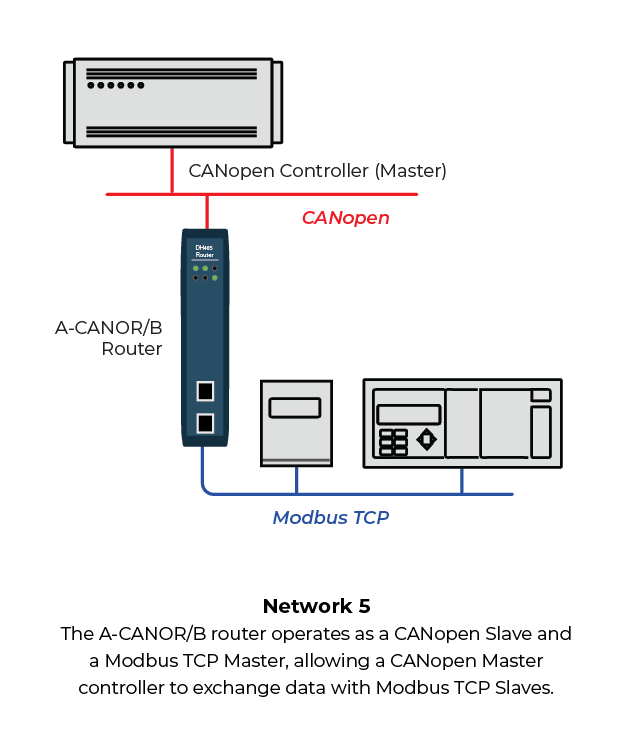
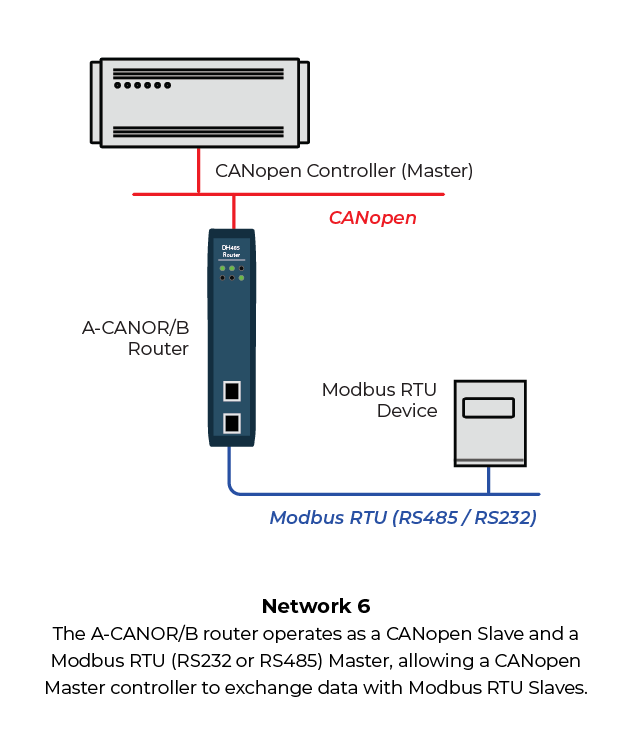
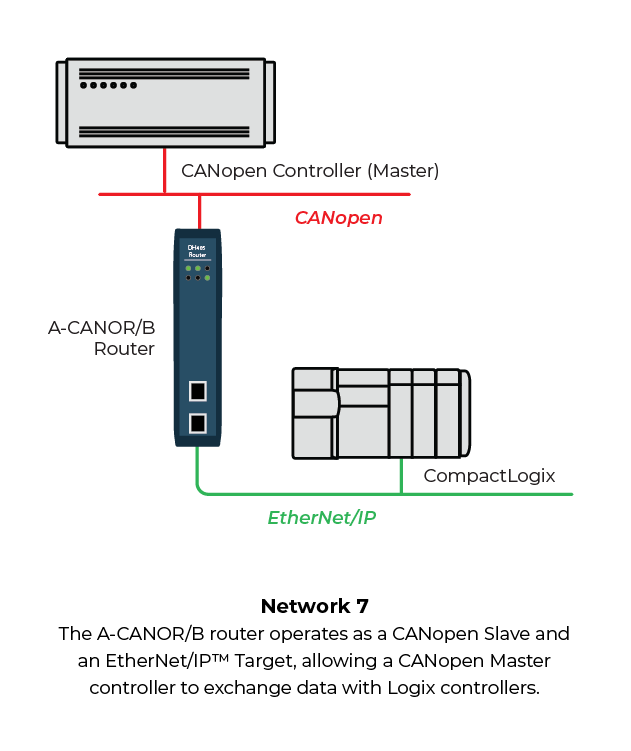
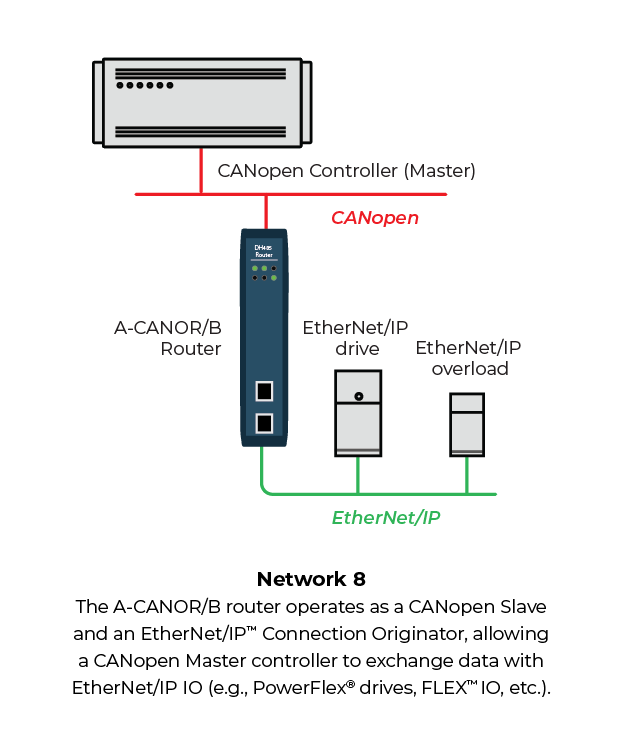
The A-CANOR/B CANopen® Router/B provides intelligent data routing between either EtherNet/IP™, Modbus® RTU or Modbus TCP/IP® and the CANopen bus network. This allows the user to integrate CANopen devices into a Rockwell® Logix platform (e.g. ControlLogix® or CompactLogix™) or any Modbus device with minimal effort.
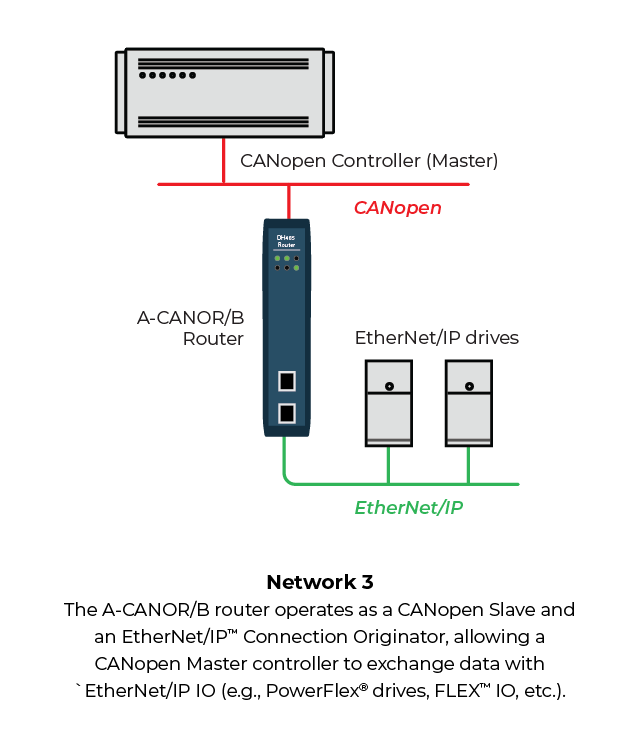
The module can be configured to be either a CANopen Master or Slave allowing the user to not only integrate CANopen devices into a Logix or Modbus system, but to also allow the user to use Logix, Modbus, or EtherNet/IP devices in an existing CANopen network (by using the CANopen Router B in Slave mode). In a Logix system the module can use Direct-To-Tag technology allowing CANopen devices to exchange data with a Logix controller without the need to write any ladder or application code in Studio 5000.
The module also provides a range of statistics to simplify the diagnostic process as well as a CANopen packet capture for remote diagnosis. A built-in webserver provides detailed diagnostics of system configuration and operation, including the display of CANopen operation and communication statistics, without the need for any additional software.
Architectures
|
|
|

|
|
|
|
|
Features and Benefits
- CANopen Master or Slave.
- The router can be configured as an EtherNet/IP Target or Originator, Modbus Master or Slave, to read/write data from a CANopen network.
- EtherNet/IP Class 1 connection for Target and Originator as well as Explicit Messaging.
- Modbus RTU (RS-232 and RS-485) or Modbus TCP/IP.
- Support for up to 124 CANopen Slaves (when in Master mode).
- CANopen Slave mode can emulate up to 128 PDOs with various CANopen node addresses.
- Support for up to 32 PDOs (receive and transmit) per CANopen Slave.
- Support for mapping of 128 SDOs with any type of operating interface.
- Time synchronization of the CANopen network.
- Direct-To-Tag technology for Logix controllers.
- Advanced diagnostics including packet capture and web server.
- Dual Ethernet ports which supports DLR (Device Level Ring).
- NTP (Network Time Protocol) for external time synchronization.
- Master Mode supports NMT message to initialize network.
- Supports CANopen LSS Node and Bit Rate assignment.
- Supports CiA 443 Bootloader Auto-enable.
- Supports all error and emergency (EMCY) messages and handling.
- Supports all CANopen Baud rates.
Configuration
The Slate Configuration Utility software is used for configuration and troubleshooting of the module. The stand-alone configuration utility allows users to define the setup and configuration of the CANopen Router/B module, connections with controllers and devices.
The configuration utility can be downloaded from the "Downloads" section.
Specifications
EtherNet/IP Network
| Specification |
Description |
| Connector |
RJ45 |
| Conductors |
CAT5 STP/UTP |
| ARP Connections |
200 max. |
| TCP Connections |
200 max. |
| CIP Connections |
15 max. |
| Communication Rate |
10/100 Mbps |
| Duplex Mode |
Full / Half |
| Auto-MDIX Support |
Yes |
| Embedded Switch |
Yes, 2 x Ethernet ports |
| Device Level Ring (DLR) |
Yes |
| Network Time Protocol |
Yes |
Serial Port (RS-232)
| Specification |
Description |
| Connector |
9-way terminal (shared with RS-485) |
| Connector |
24 to 18 AWG |
| Electrical Isolation |
1000 VDC |
| Supported Baud Rates |
1200, 2400, 4800, 9800, 19200, 38400, 57600, 115200 |
| Parity |
Even, Odd, None |
| Data Bits |
8 |
| Stop Bits |
1 |
Serial Port (RS-485)
| Specification |
Description |
| Connector |
9-way terminal (shared with RS-485) |
| Connector |
24 to 18 AWG |
| Electrical Isolation |
1500 Vrms for 1 minute |
| Supported Baud Rates |
1200, 2400, 4800, 9800, 19200, 38400, 57600, 115200 |
| Parity |
Even, Odd, None |
| Data Bits |
8 |
| Stop Bits |
1 |
CANopen Network
| Specification |
Description |
| Connector |
5-way terminal, 5.08 mm pitch. |
| Modes |
Master, Slave |
| Supported Baud Rates |
10k, 20k, 50k, 125k, 250k, 500k, 800k,1M |
| CANopen Terminator |
120 Ω (Software enabled) |
CANopen Master
| Specification |
Description |
| CANopen Slave Count |
124 |
| PDO Count per Device |
32 |
| SDO Mapping Count |
128 |
| CANopen Slave Auto Parameterize |
Yes |
| CiA 443 Support |
Yes |
| NMT Messages |
Operational Control (e.g. Stopped, Preoperational, Operational), SYNC, TIME, EMCY |
| Layer Setting Services (LSS) |
Node and BitRate assignment supported |
CANopen Slave
| Specification |
Description |
| PDO Emulation Count |
125 |
| Emulated Devices Supported |
125 |
| MPDO Supported |
Yes |
EtherNet/IP Target
| Specification |
Description |
| Class1 Cyclic Connection Count |
4 |
| Logix Direct to Tag Supported |
Yes |
EtherNet/IP Originator
| Specification |
Description |
| Class1 Cyclic Connection Supported |
Yes |
| Class 3 UCMM Connections Supported |
Yes |
| Class 1 Connection Count |
5 |
| Class 3 UCMM Connection Count |
5 |
| Class 3 UCMM Mapping Count |
50 |
Modbus
| Specification |
Description |
| Modes Supported |
Modbus TCP/IP, Modbus RTU (RS-232, RS-485) |
| RS-485 Termination |
125 Ω (Software enabled) |
| Slave devices (Client/Master only) |
20 max. |
| Modbus Mappings (Client/Master only) |
100 max |
| Mapping Ranges |
0 to 65535 |
| Base Offset |
Modbus (base 0); PLC (base 1) |
| PDO Emulation Count |
125 |
| Emulated Devices Supported |
125 |
| MPDO Supported |
Yes |
Hardware
| Specification |
Description |
| Power Supply |
Input: 10 to 32 VDC, (70 mA @ 24VDC) |
| Power Consumption |
1.8 W |
| Dimensions (H x W x D) |
148.0 x 34.0 x 116.0 mm |
| Connector |
5-way terminal, 5.08 mm pitch. |
| Conductors |
24 to 18 AWG |
| Enclosure Rating |
IP20, NEMA/UL Open Type |
| Temperature |
-20 to 70 °C |
| Earth Connection |
Yes, terminal based |
| Emissions |
IEC 61000-6-4 |
| ESD Immunity |
EN 61000-4-2 |
| Radiated RF Immunity |
IEC 61000-4-3 |
| EFT/B Immunity |
IEC 61000-4-4 |
| Surge Immunity |
IEC 61000-4-5 |
| Conducted RF Immunity |
IEC 61000-4-6 |
| PDO Emulation Count |
125 |
| Emulated Devices Supported |
125 |
| MPDO Supported |
Yes |
Certifications
| ODVA Certification | 127.96 kB | Last Modified 05/12/2023 |
| UL/cUL; Class1, Div 2 | 238.99 kB | Last Modified 01/25/2024 |
| CE Declaration of Conformity (CE, UKCA, RoHS, UL) | 570.54 kB | Last Modified 06/26/2026 |
| ATEX Letter Of Conformity | 101.09 kB | Last Modified 10/13/2023 |